
Every way to pay on klik: cash, telebirr, M-Pesa, Arifpay, Chapa and StarPay
Every way to pay for a klik order, how to choose one at checkout, and what to know about phone orders on 664 and refunds.

Key points
- klik customers in Addis Ababa can pay for an order with telebirr, M-Pesa, Arifpay, Chapa, StarPay or cash on delivery.
- Chapa and StarPay are new at klik checkout since klik 2.2, released on 12 November 2026; cash, telebirr, M-Pesa and Arifpay were already there.
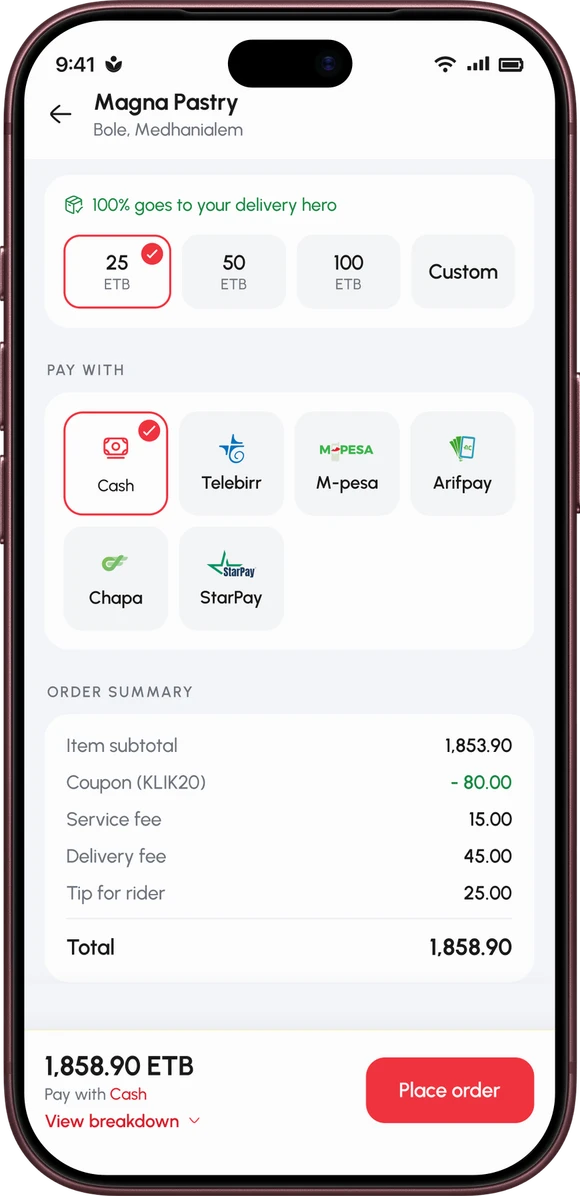
- On klik, the payment method is chosen in the Pay with section of the cart, and the app shows the final total, delivery included, before you confirm.
- The payment methods offered at klik checkout can vary by store, so the Pay with list shows the options for each order.
- Orders placed by phone on 664 can be paid in cash or digitally, and the klik dispatcher confirms the options on the call.
Every way to pay, one checkout
Most people already have a way they like to pay: cash in the pocket, or a mobile money app on the phone. The klik checkout is built so you can keep using it. At the end of every order, the Pay with list shows the options for that order, you tap one, and that is the whole decision.
The options are not identical everywhere. The methods offered can vary by store, so a method you used for one order may not appear on the next. Check the Pay with list each time rather than assuming.
Here is what each option is.
Cash on delivery
Choose Cash at checkout and pay the klik rider at your door once the order is in your hands. Having the right change ready makes the handover quicker.
telebirr
telebirr is the mobile money option many klik customers already use. Pick it in Pay with, place the order and complete the payment as the app shows you.
M-Pesa
M-Pesa sits in the same list. Choose it at checkout and complete the payment as the app shows you.
Arifpay
Arifpay has been at klik checkout since klik 2.0 in August 2026. klik and Arifpay also signed a partnership in October 2026 that brings Arifpay's point-of-sale and QR-code payments to restaurants in klik's partner network, so you may meet Arifpay at the restaurant counter as well as in the app.

Chapa (new in klik 2.2)
Chapa is new at checkout in klik 2.2, next to cash, telebirr, M-Pesa and Arifpay. It follows klik's partnership with Chapa, announced on 3 November 2026, under which klik integrates Chapa's payment gateway.

StarPay (new in klik 2.2)
StarPay Ethiopia arrived in the same update as Chapa. Choose StarPay in Pay with where it is offered and complete the payment as the app shows you.
How to choose a payment method, step by step
- Add what you want to the cart in any klik mini-app, then open the cart.
- Check the delivery address and any instructions for the rider.
- Scroll to Pay with and tap the method you want from the ones listed for this order.
- Read the total. The app adds the order and the delivery together and shows one final number before you confirm.
- Tap Place order. For cash, you are done until the rider arrives. For a digital method, complete the payment as the app shows you.
If you cannot see Chapa or StarPay at all, check that you are on klik 2.2 or later and update from the App Store or Google Play if not. If you are up to date and a method is still missing, that store does not offer it: pick one of the methods that is listed.
Paying for a phone order on 664
No smartphone, or no data today? Dial 664 from your mobile between 08:00 and 21:00 and a klik dispatcher takes the order in Amharic or English. Phone orders are not cash only: you can pay in cash at the door or digitally, and the dispatcher confirms the options for your order on the call. Our page on ordering by phone covers the rest.

Refunds
Where a refund applies, klik pays it back to your original payment method within a reasonable time. Orders that a rider has already collected and is delivering are generally not refunded, unless the service failed because of klik. The terms of use set out the full rules.
If something went wrong with an order, klik 2.2 lets you report it inside the app: go to Profile, then Feedback, and add a note, a voice message or photos. You can follow the report until it is sorted. 664 still works if you would rather talk to someone.
Ordering for a company
Businesses that order regularly do not have to pay order by order. klik Business bills on postpaid invoicing, with terms agreed per contract.
Why the list keeps growing
klik adds payment methods through partnerships with payment companies. Arifpay was there from klik 2.0; the agreements with Arifpay in October and Chapa in November were followed by Chapa and StarPay at checkout in klik 2.2.
Quick answers
The short version, for anyone in a hurry.
Can I pay cash on delivery with klik?
Does klik accept telebirr?
Can I pay with Chapa or StarPay on klik?
Can I pay digitally when I order by phone on 664?
Will I see the total before I pay?
Ready to order? Get the klik app and pick your payment method at checkout.

